
SwiftUI
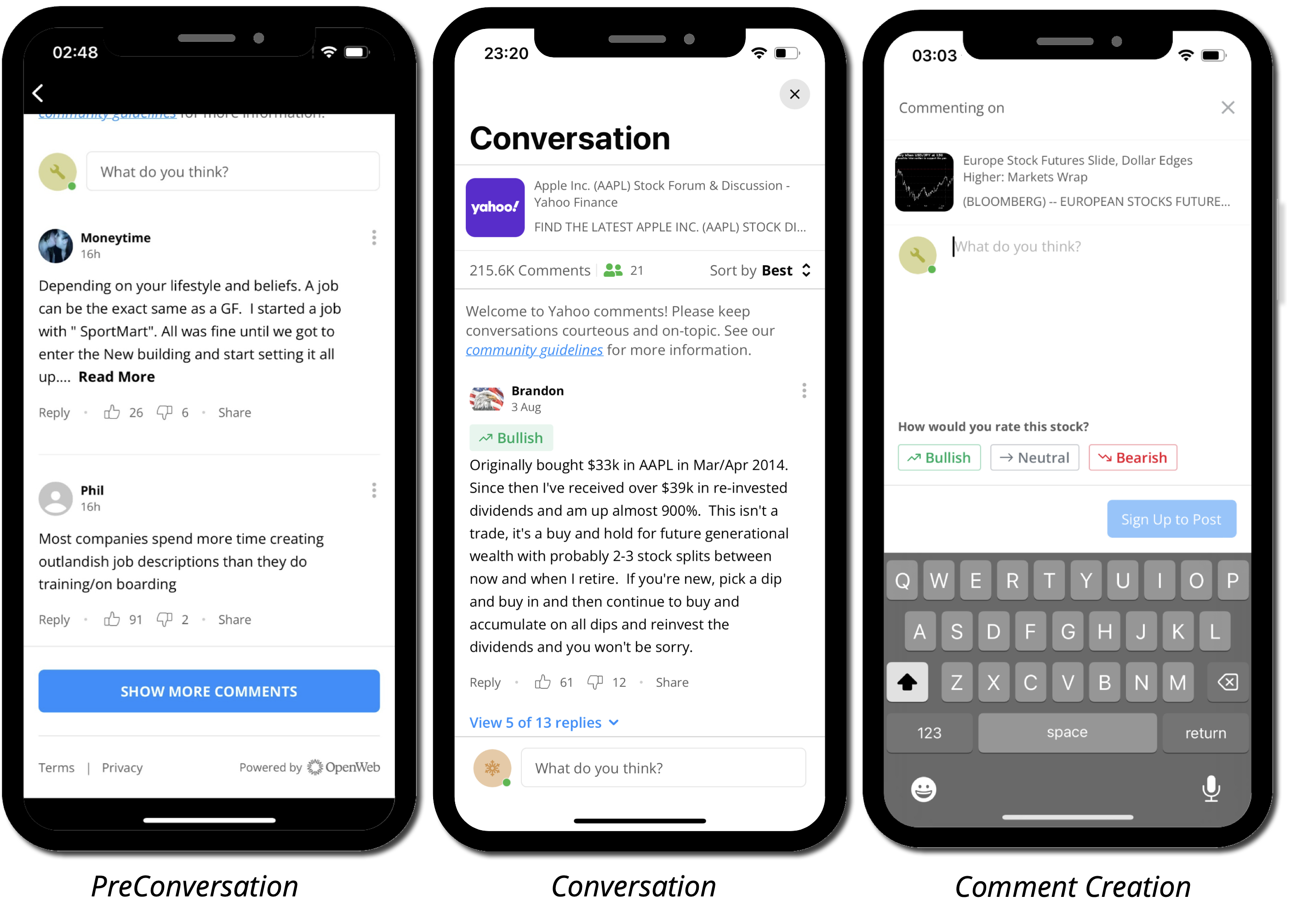
Use native SwiftUI Views to add Conversation to your app.
The OpenWeb SDK provides SwiftUI Views as an alternative to the UIKit-based Components approach. These Views handle all the UIKit bridging internally, so you can use them directly in your SwiftUI hierarchy.
| View | Description |
|---|---|
OpenWebConversation | Full conversation |
OpenWebPreConversation | Pre-conversation that opens the full conversation when tapped |
OpenWebConversationCount | Fetches and displays the comment count for a post |
OpenWebReactions | Card that lets readers react to an article with a single tap |
PrerequisitesSet your
spotIdbefore using any SwiftUI Views. YourspotIdis provided by your PSM.OpenWeb.manager.spotId = "your_spot_id"
OpenWebConversation
Displays the full conversation for a given post.
Full Conversation
import OpenWebSDK

struct ArticleView: View {
    var body: some View {
        NavigationLink("Comments") {
            OpenWebConversation(postId: "my-post-id") // <--
        }
        Text("Your article content ...")
    }
}
Comment Thread
OpenWebConversation(
    postId: "my-post-id",
    route: .commentThread(commentId: "comment-123")
)
Comment Creation
OpenWebConversation(
    postId: "my-post-id",
    route: .commentCreation(type: .comment)
)
Handling Errors and Callbacks
OpenWebConversation(postId: "my-post-id")
    .onError { error in
        // handle error
    }
    .onConversationDismissed { type, source, postId in
        // perform additional actions when conversation is dismissed
    }
    .onOpenPublisherProfile { userId, type, mode, source, postId in
        // if useCustomUserProfile config is set — navigate to your own profile screen
    }
Customizing Appearance
OpenWebConversation(postId: "my-post-id")
    .conversationStyle(.compact)
    .commentCreationStyle(.floatingKeyboard)
    .headerStyle(.none)
    .readOnlyMode(.disabled)
    .allowPullToRefresh(false)
Modifiers
| Modifier | Description |
|---|---|
.allowPullToRefresh(_:) | Enable or disable pull-to-refresh. Default: true |
.articleExtraData(_:) | Provide local article metadata (OWArticleExtraData) |
.commentCreationStyle(_:) | Comment creation style: .regular, .floatingKeyboard, .light |
.conversationStyle(_:) | Conversation style: .regular, .compact, or .custom(...) |
.headerStyle(_:) | Article header style (OWArticleHeaderStyle) |
.onConversationDismissed(_:) | Called when the conversation is dismissed |
.onError(_:) | Called when an error occurs |
.onOpenPublisherProfile(_:) | Called when a publisher profile is tapped |
.readOnlyMode(_:) | Read-only mode: .enable, .disable, .server |
.starRatingEnabled(_:) | Enable or disable star rating |
OpenWebPreConversation
Displays the pre-conversation and opens the full conversation when tapped. Use .conversationNavigation(_:) to control how the full conversation is presented.
Basic Usage
import OpenWebSDK

struct ArticleView: View {
    var body: some View {
        ScrollView {
            articleContent
            OpenWebPreConversation(postId: "my-post-id")
        }
    }
}
With Navigation Mode
By default, tapping the pre-conversation opens the full conversation in full screen. Use .conversationNavigation(_:) to change this:
OpenWebPreConversation(postId: "my-post-id")
.conversationNavigation(.push)OpenWebPreConversation(postId: "my-post-id")
.conversationNavigation(.sheet)Custom Navigation Handling
For full control over how the full conversation is presented:
OpenWebPreConversation(postId: "my-post-id")
    .conversationNavigation(.custom(callbacks: { callbackType, postId in
        if case .openConversationFlow(let route) = callbackType {
            conversationRoute = route
        }
    }))
    .sheet(item: $conversationRoute) { route in
        OpenWebConversation(postId: "my-post-id", route: route)
    }
Handling Callbacks
OpenWebPreConversation(postId: "my-post-id")
    .conversationNavigation(.fullScreen)
    .onError { error in
        // handle error
    }
    .onConversationDismissed { type, source, postId in
        // perform additional actions when the full conversation is dismissed
    }
    .onOpenPublisherProfile { userId, type, mode, source, postId in
        // if useCustomUserProfile config is set — navigate to your own profile screen
    }
Customizing Appearance
OpenWebPreConversation(postId: "my-post-id")
    .preConversationStyle(.compact)
    .conversationStyle(.regular)
    .headerStyle(.regular)
    .readOnlyMode(.disabled)
Modifiers
| Modifier | Description |
|---|---|
.allowPullToRefresh(_:) | Enable or disable pull-to-refresh. Default: true |
.articleExtraData(_:) | Provide local article metadata (OWArticleExtraData) |
.commentCreationStyle(_:) | Comment creation style: .regular, .floatingKeyboard, .light |
.conversationNavigation(_:) | How to present the full conversation: .fullScreen (default), .sheet, .push, .custom(callbacks:) |
.conversationStyle(_:) | Conversation style: .regular, .compact, or .custom(...) |
.headerStyle(_:) | Article header style (OWArticleHeaderStyle) |
.onConversationDismissed(_:) | Called when the conversation is dismissed |
.onError(_:) | Called when an error occurs |
.onOpenPublisherProfile(_:) | Called when a publisher profile is tapped |
.preConversationStyle(_:) | Pre-conversation style: .regular, .compact, .ctaButtonOnly, .ctaWithSummary, .custom(...) |
.readOnlyMode(_:) | Read-only mode: .enable, .disable, .server |
.starRatingEnabled(_:) | Enable or disable star rating |
OpenWebConversationCount
Fetches and displays the comment count for a post.
Basic Usage
The simplest usage handles only the success case. A ProgressView is shown while loading, and the view is hidden on failure.
import OpenWebSDK

struct ArticleHeaderView: View {
    var body: some View {
        OpenWebConversationCount(postId: "my-post-id") { counter in
            Text("\(counter.commentsNumber) comments")
        }
    }
}
Full Control
For complete control over loading, success, and failure states, use the Result-based initializer:
OpenWebConversationCount(postId: "my-post-id") { result in
    switch result {
    case .none:
        ProgressView()
    case .success(let counter):
        Label("\(counter.commentsNumber)", systemImage: "bubble.right")
    case .failure:
        Label("--", systemImage: "bubble.right")
    }
}
OpenWebReactions
Displays a card with a question and reaction options that readers answer with a single tap. See Reactions for full documentation.
import OpenWebSDK

struct ArticleView: View {
    var body: some View {
        ScrollView {
            articleContent
            OpenWebReactions(postId: "my-post-id")
        }
    }
}
Enumerations and Structs
Many of the types used by SwiftUI Views are shared with the UIKit API. See UIKit Enumerations and Structs for the full reference.
OWConversationCounter
See OWConversationCounter for the returned data structure.
OWConversationNavigationMode
How the full conversation is presented from the pre-conversation.
| Case | Description |
|---|---|
.present(.fullScreen) | Present as a full-screen cover (default) |
.present(.pageSheet) | Present as a sheet |
.push | Push onto the navigation stack |
.custom(callbacks:) | Handle navigation yourself via OWPreConversationActionsCallbacks |
Updated 3 months ago